Use Cases for Classify

Financial institutions and insurers that receive PDFs containing multiple document types for a single customer or application.

Healthcare systems ingesting patient records received as batched PDFs.

Accounting departments processing PDFs containing multiple invoices and receipts.

Organizations managing product catalogs where one PDF contains specifications for multiple products.
Not all document classifiers created equal.
The Classify API lets you label each page of a document by type before parsing, enabling you to route pages to different processing pipelines based on their content. Unlike manual sorting or parsing-first approaches, it automates page-level classification for mixed or multi-type documents, improving downstream accuracy and efficiency.
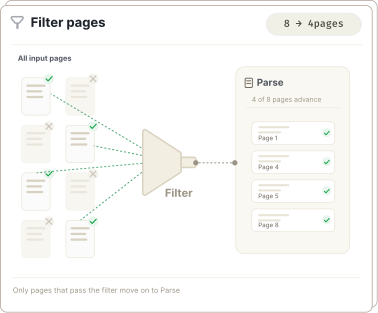
Filter Pages Before Parsing
Decide quickly which documents should advance to be parsed and which should not.
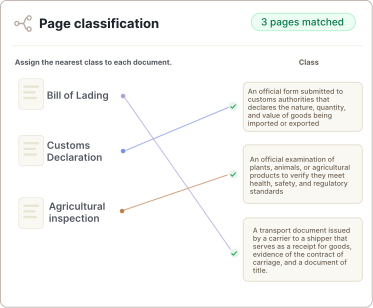
Assign a Class to Each Page
JSON output returns the class assignment for each page in the document.
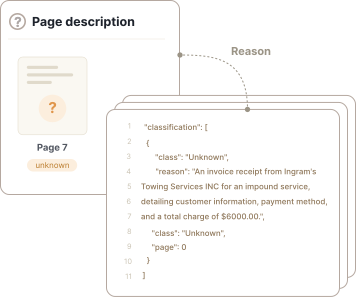
Generate a Page Description
All pages, including unknowns, receive a ‘reason’ which contains a high level description of the page.
What you get
- Agentic system that plans and executes
- Handles single pages or hundreds
- Developer friendly APIs
- No fine-tuning or templates required
- Returns clean JSON
- Prompt to generate class list
- A description of every page including unknowns
- Works in English and 20+ languages
- Fast response
- Inexpensive classifier
- An intelligent filtering system
- Works seamlessly with Parse
Built for complex, real-world documents.
Classify saves time and credits by acting as a filter before documents are parsed. Run a quick classification to detect if a page matches what is expected or to remove pages that don't require parsing.
Read the Docs for Classify →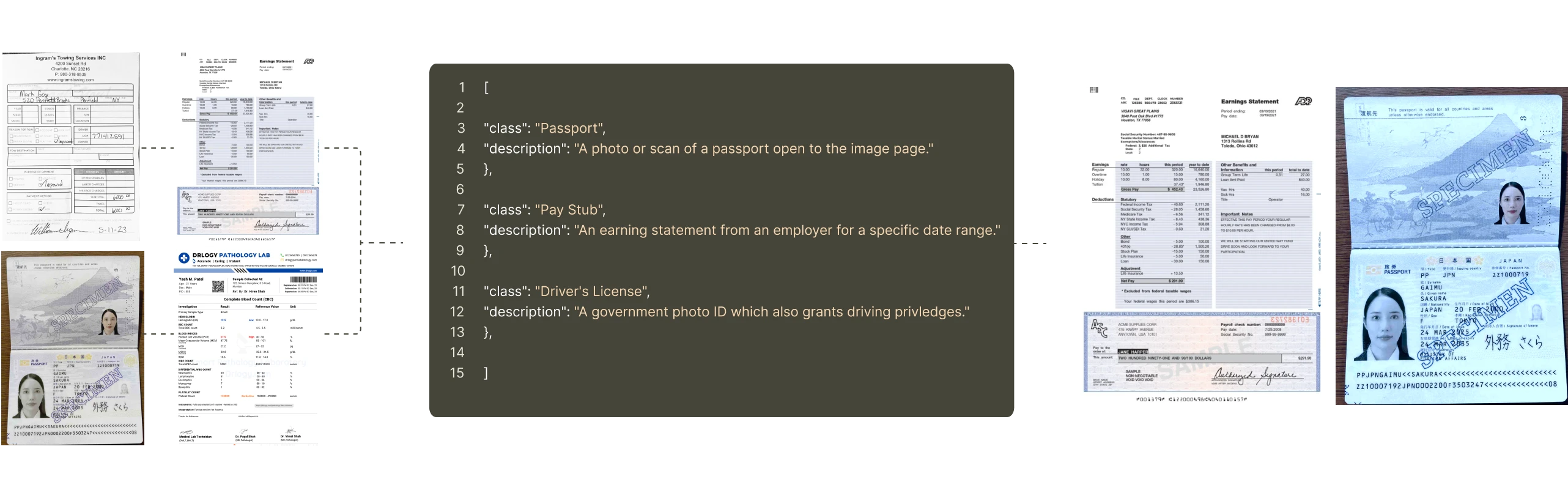
Prototype in the UI. Scale with the API.
Use the Agentic Document Extraction Visual Playground for rapid prototyping and experimentation.
Then transition seamlessly to the REST API, Python library, or TypeScript library. Classify is in Preview.
Provide Agent Skills directly to coding assistants to accelerate your development.
curl -X POST 'https://api.va.landing.ai/v1/ade/classify' \
  -H 'Authorization: Bearer YOUR_API_KEY' \
  -F 'classes=[
    {"class":"Class 1","description":"Description of Class 1"},
    {"class":"Class 2","description":"Description of Class 2"}
    ]' \
-F 'document=@document.pdf'from landingai_ade import LandingAIADE
client = LandingAIADE()
classes = [
{"class": "invoice", "description": "description"},
{"class": "bank_statement", "description": "description"}
]
response = client.classify(
classes=json.dumps(classes),
document=Path("/path/to/document.pdf"),
model="classify-latest"
)
for result in response.classification:
print(f"Page {result.page}: {result.class_}")


Frequently asked questions
The Classify API response contains two main fields: classification (an array with per-page classification results) and metadata (an object with processing info like credit usage, duration, and page count). The per-page classification results array is called classification. Each entry includes: page (0-indexed), class (assigned label or unknown), reason (explanation for the label), and suggested_class.
When Classify cannot confidently assign a class to a page, it sets the page’s class label to unknown and provides a suggested_class with the closest match. This helps you review borderline pages or refine your class list.