Build a Schema of
structured fields for
use with Extract
Build Schema allows you to:
- Use natural language to create an extraction schema
- Build a master schema directly from multiple documents
- Make an existing schema more robust for production use
Not all schema builders created equal.
The Schema Builder API lets you programmatically generate or refine extraction schemas directly from parsed Markdown, enabling automation and integration into pipelines without manual schema design. It supports building master schemas from multiple documents to handle field and layout variation, and can detect schema drift by surfacing new or changed fields.
Start from a Prompt
Accepts natural language inputs to define the fields and their relationships.
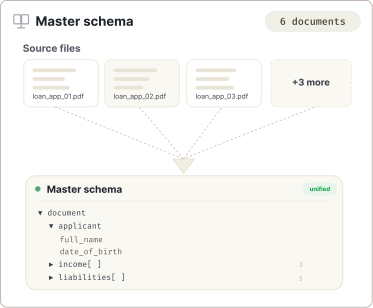
Master Schema Creation
Reviews multiple files to create a master schema that applies across the set.
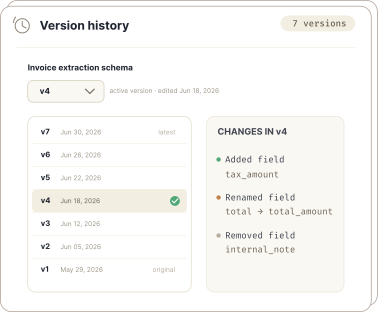
Built-in Version Control
Keeps a record of all schema changes. Assigns a version number after each change.
What you get
- Agentic system that plans and executes
- Develop with natural language
- Easy pipeline integration
- Developer-friendly API
- Returns perfectly-formatted clean JSON
- Creation of deeply nested schemas
- Build a zero-shot schema from documents
- Automated generation of long schemas
- Build a schema in English or other languages
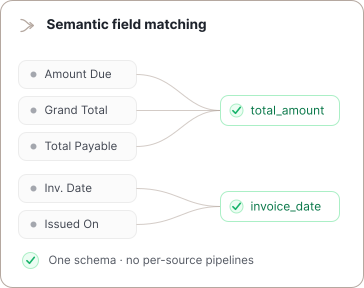
- Schema drift detection
- Works seamlessly with Parse
- Works seamlessly with Extract
Built for complex, real-world documents.
Start with a set of documents and a natural language prompt. The Build Schema API will return an expertly written, ready-to-use schema with complete descriptions, formatting instructions and alternative field names.
Read the Build Schema docs →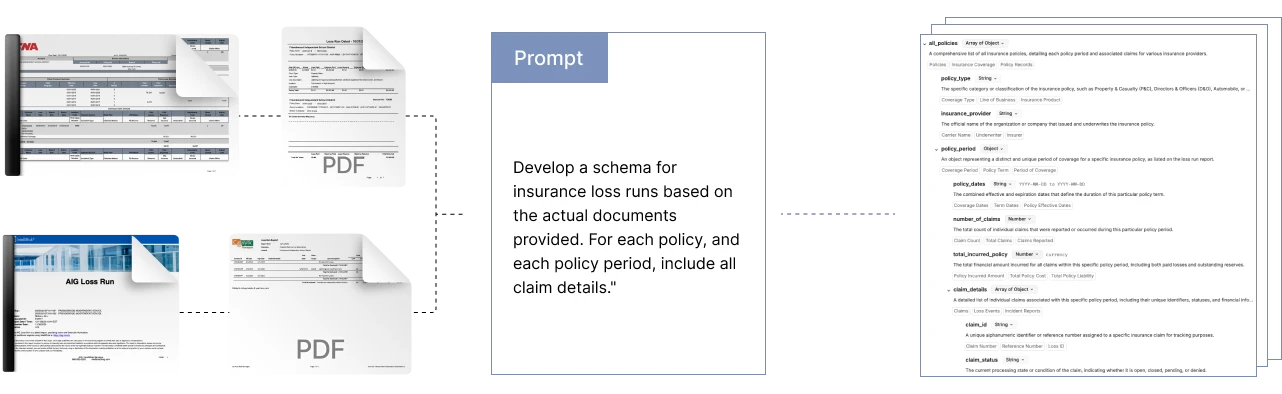
Prototype in the UI. Scale with the API.
Use the Agentic Document Extraction Visual Playground for rapid prototyping and experimentation.
Then transition seamlessly to the REST API for your production workloads.
Provide Agent Skills directly to coding assistants to accelerate your development.
curl -X POST 'https://api.va.landing.ai/v1/ade/extract/build-schema'\
  -H 'Authorization: Bearer YOUR_API_KEY' \
  -F 'markdowns=@markdown.md' \
  -F 'model=extract-latest' \
-F 'prompt= vendor, purchase date, and total amount'headers = {
'Authorization': 'Bearer YOUR_API_KEY'
}
url = 'https://api.va.landing.ai/v1/ade/extract/build-schema'
files = [('markdowns', open('markdown.md', 'rb'))]
data = {
'model': 'extract-latest',
'prompt': 'Extract vendor name, purchase date, and total amount'
}
response = requests.post(url, files=files, data=data, headers=headers)
print(response.json())


Frequently asked questions about schema-building
The Build Schema API returns a response with two main fields: extraction_schema (the generated JSON schema as a string) and metadata (including job_id, duration_ms, credit_usage, and version).
You can create your first extraction schema using the Playground’s interactive prompts or by using the Build Schema API, which generates a schema from your instructions. In both cases you can use a prompt to create your first schema or use a set of reference documents without a prompt. Combining reference documents and prompts typically generates higher quality schemas, but only one or the other is required.
Yes. Download the schema from the UI using the Export Schema option. The API is not able to access the work you've done in the UI.
Yes, you can use Build Schema to improve an existing schema by passing your schema in the schema parameter. It can detect schema drift and refine your schema by surfacing new or changed fields from updated documents. It can make your schema more robust to real-world variation by suggesting alternative names for fields. It can improve the descriptions you have written for each field.
The number of credits used to build an extraction schema is based on both the number of input characters and output characters, and is rounded up to the nearest tenth decimal place. credits = (input characters ÷ 5,000) + (output characters ÷ 1,000)